
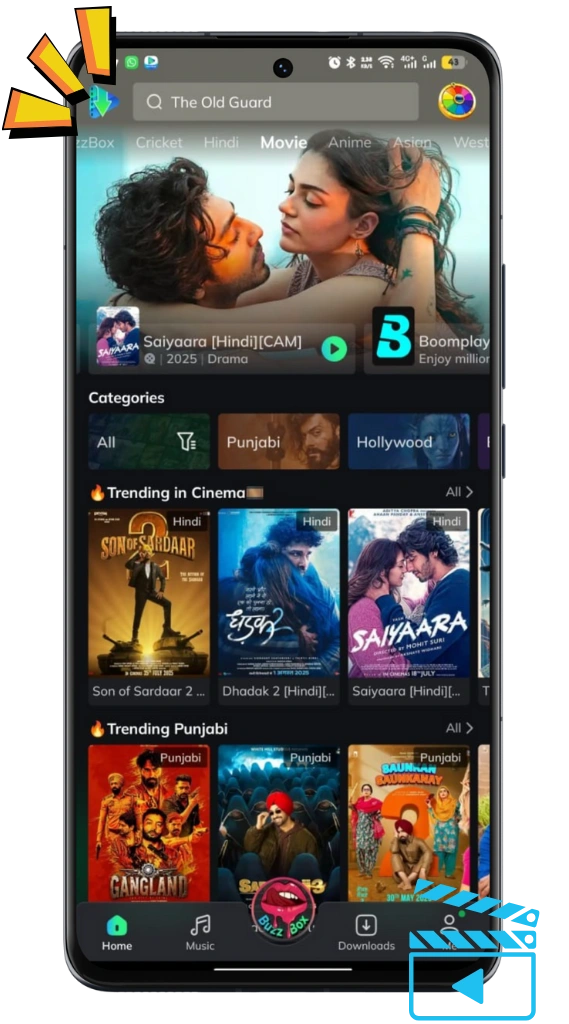
MovieBox
MovieBox gives viewers a convenient entertainment hub for discovering films, television series, dramas, and anime in one place. Instead of switching between multiple streaming platforms, users can explore different options through a streamlined browsing experience. Whether you crave heart-pounding action, emotional romances, spine-chilling horror, or vibrant animated adventures, MovieBox APP makes it easier to find content that matches your mood. Moreover, its intuitive layout keeps navigation simple and reduces unnecessary clutter. As a result, viewers can spend less time searching and more time enjoying their chosen entertainment.
What Is MovieBox App?
MovieBox ApK is a digital media discovery tool that lets users browse and view various video titles. Its library typically spans feature films, ongoing series, international dramas, and anime. Rather than forcing you to jump across distinct services, the app consolidates various genres into a single, straightforward interface.
Navigation forms the backbone of the experience. Users can jump between trending categories, run direct title searches, and organize their watchlists with minimal effort. Because the app exists in multiple builds and regional variants, exact features, library depth, and content availability often differ.
Discover Movies Across Every Genre
Variety drives modern viewing habits. MovieBox Download caters to diverse tastes by organizing its catalog into dedicated genre hubs.
- Action & Adventure: High-octane stunts, fast chases, and epic hero journeys.
- Comedy: Feel-good stories, stand-up specials, and lighthearted humor for quick relaxation.
- Romance & Drama: Emotional, character-driven narratives that dive deep into relationships.
- Sci-Fi & Fantasy: Imaginative worlds, futuristic technology, and mythical lore.
- Horror, Thriller & Mystery: Suspenseful plots filled with unexpected twists and dark themes.
- Animation & Documentaries: Visual storytelling for all ages alongside real-world investigative stories.
Browsing by category helps you quickly find a title that matches your immediate mood. If you want a casual, relaxing evening, jump straight into the comedy section. If you want edge-of-your-seat tension, head over to the thriller tab.

Explore Anime and Global Productions
Viewers no longer restrict themselves to local Hollywood releases. Global cinema, Asian dramas, and Japanese anime have built massive international audiences. MovieBox Pro accommodates this shift by showcasing international productions alongside mainstream releases.
Exploring global content introduces unique storytelling styles, foreign cultures, and novel tropes. However, library access naturally shifts based on licensing agreements and regional updates. Check the active catalog regularly to see which global titles remain available in your territory.
Effortless Search and Content Discovery
A massive library quickly becomes overwhelming without reliable discovery tools. MovieBox IOS focuses on keeping search functions responsive and straightforward:
- Direct Keyword Search: Type partial titles, director names, or actor keywords to find specific titles in seconds.
- Category Filters: Narrow down choices by genre, release year, or language preference.
- Smart Recommendations: Discover fresh titles based on your past search history and browsing trends.
Clean, User-Friendly Interface
Complex menus ruin user experiences. MovieBox Andriod stresses clean layouts, clear typography, and responsive controls. Clear navigation benefits both tech-savvy users and newcomers. Reducing menu bloat ensures you spend less time configuring settings and more time enjoying media. Still, individual performance hinges on external factors like screen resolution, internet bandwidth, and device specifications.
Core Features Worth Exploring
While features vary across builds, standard releases often contain these core functions:
- Extensive Media Catalogs: Browse thousands of organized titles.
- Subtitles & Audio Tracks: Access multiple language settings for global releases.
- Built-in Player Controls: Adjust playback speed, aspect ratio, and video resolution on the fly.
- Watchlist Management: Save interesting shows for future viewing sessions.
- Offline Modes: Download select titles for offline playback when traveling.
MovieBox for Android Devices
Android’s flexible OS makes it the most common environment for MovieBox Install However, mobile users should follow key precautions before installing the app:
- Verify File Integrity: Only download APK packages from vetted, highly rated portals.
- Audit Permissions: Avoid apps that request unusual access, such as contact lists, SMS logs, or location tracking.
- Keep Security Active: Run updated mobile antivirus scanners and keep your Android system OS patched.
Network Requirements and Data Tips
High-definition video streams require solid network bandwidth. An unstable connection causes frequent buffering, dynamic resolution drops, and playback lag.
| Connection Type | Recommended Speed | Usage Advice |
| Wi-Fi (Home) | 10+ Mbps | Ideal for HD/4K streaming without data caps. |
| Mobile Data (4G/5G) | 5+ Mbps | Watch resolution settings; high-quality video consumes data quickly. |
| Offline Downloads | N/A | Download over Wi-Fi beforehand to preserve mobile data limits. |
Comparing MovieBox and Traditional Streaming Services
Understanding how MovieBox Mod compares to licensed, subscription-based apps helps you set realistic expectations.
| Feature | MovieBox App | Traditional Streaming (Netflix, Hulu, etc.) |
| Catalog Structure | Combined multi-source aggregator | Proprietary, licensed exclusive catalogs |
| Pricing Model | Often free or ad-supported (varies) | Fixed monthly or annual subscriptions |
| Platform Support | Primarily Android/Third-Party APKs | Native apps across TV, Web, iOS, & Android |
| Customer Support | Community-driven or version-dependent | 24/7 dedicated corporate support |
| Offline Playback | Depends on the specific build | Standard feature across paid tiers |
Safety Guidelines Before You Install
Prioritize system security whenever you evaluate third-party media tools:
- Inspect App Permissions: Make sure the app only asks for storage or network access necessary for video playback.
- Respect Local Laws: Review digital copyright regulations in your country regarding third-party aggregators.
- Use Official Services When Possible: Licensed platforms offer the highest security, legal safety, and video quality guarantees.
Conclusion
Movie Box App provides a unified space to explore movies, series, anime, and foreign dramas. Its straightforward interface and diverse category hubs appeal to casual viewers looking to simplify their daily entertainment routine.However, always practice safe digital habits. Verify file safety, keep your operating system updated, and review legal permissions in your region. Balancing convenience with safety ensures a hassle-free entertainment setup.
Frequently Asked Questions (FAQs)
What primary content can I find on MovieBox App?
APP offers movies, episodic TV series, international dramas, and anime, depending on the specific build and region.
Does MovieBox support television series?
Yes, many builds feature full season layouts, episode lists, and series navigation.
Is MovieBox completely safe to install on Android?
Safety depends entirely on your download source. Downloading verified packages from trustworthy sites and checking requested permissions minimizes risk.
Can I watch movies offline with MovieBox?
Some versions include download functionality for offline viewing, provided your storage supports it and local permissions allow it.
Why does streaming quality drop or buffer?
Buffering typically stems from slow internet speeds, high server traffic, or poor Wi-Fi stability. Lowering your video resolution in the playback menu often solves playback issues.
1 thought on “MovieBox App: Explore Movies, Series, and More in One Place”